Claude's /grill-me Skill: Make the AI Question You First, How to Install and Use It
An introduction to grill-me from mattpocock/skills: Claude asks in rounds, each question with a recommendation, and writes only once you agree. Install, how to answer, and a real run planning an AI training session.
/grill-me is a skill that makes Claude question you before it does the work: it asks in rounds, every question comes with a recommended answer, and it only writes once you agree. This guide introduces the skill, shows how to install it in Claude Code, how to answer quickly, and one real run: planning an internal workshop on using AI at work.
Tested on 13 October 2026 with Claude Code 2.1.296 (Opus 5.5, high effort) on Linux, auto mode on, signed in with a Claude Max plan, plugin
mattpocock-skillsversion 1.2.3. The company in the prompt is hypothetical, and the answers were written before recording. Each setup ran once, so this is a real-world observation, not a statistic. The session itself is in Vietnamese.
Watch the real terminal run (Vietnamese narration): https://youtu.be/r8mCPmYc5UY
What is grill-me?
grill-me is part of mattpocock/skills, Matt Pocock's skill collection on GitHub (about 288,000 stars on 13 October 2026, MIT licence). The skill describes itself as "a relentless interview to sharpen a plan or design".
Two things to know before you use it:
- It only runs when you call it. The grill-me
SKILL.mdsetsdisable-model-invocation: true, so Claude never picks it up on its own. You type/grill-me. - The real work happens in the
grillingskill. grill-me is a single line that callsgrilling. The collection also hasgrill-with-docs, which records decisions as documentation while it asks, and suits software projects.
How grill-me asks
According to the grilling SKILL.md, Claude treats your plan as a decision tree:
- It asks in rounds. Each round contains every question that can be asked right now. A question that depends on an unanswered one waits for a later round.
- Questions are numbered Q1, Q2…, each with a recommendation (the ➡️ line). You only correct what you disagree with.
- Facts it looks up, decisions it asks you. Anything it can find on the machine (files, tools) it finds itself.
- No work until you agree. When the questions run out, Claude summarises and waits for your confirmation.
Install
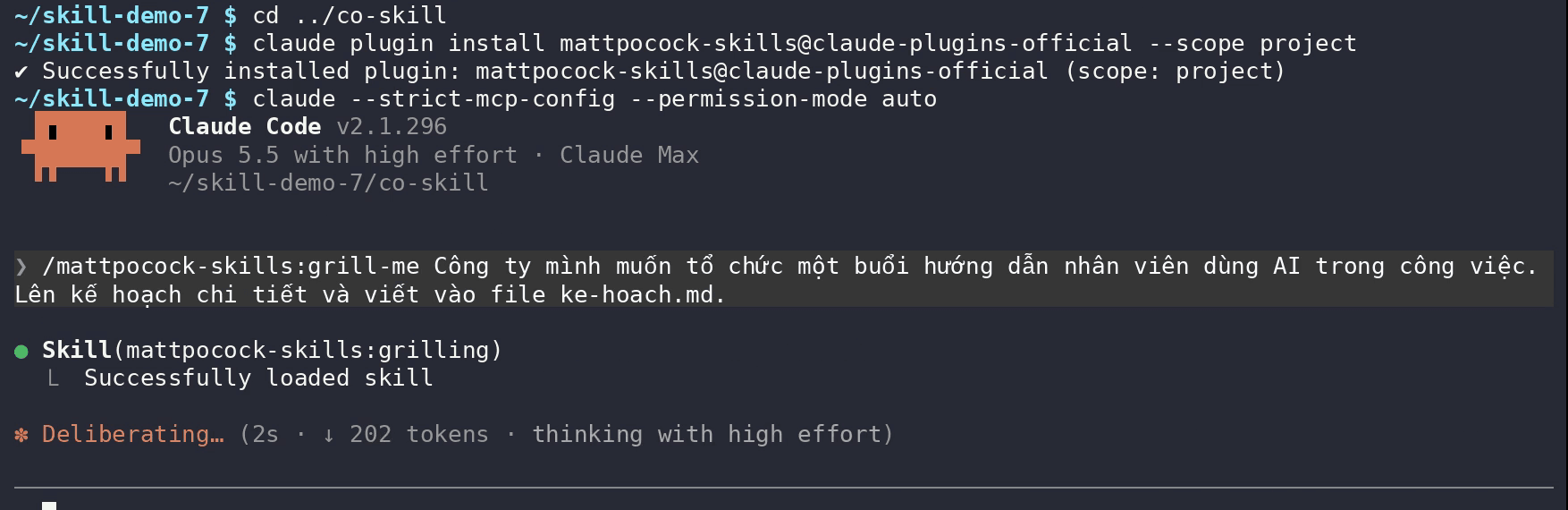
The collection is in Claude Code's official plugin marketplace. In your project folder, run:
claude plugin install mattpocock-skills@claude-plugins-official --scope project
--scope project installs it for the current folder only. Drop the flag to make the skills available in every project on the machine.
How to use it
Open Claude Code, type /grill, pick grill-me from the suggestions (the full name is /mattpocock-skills:grill-me), then write your request as usual. The request used here, translated:
/grill-me Our company wants to run a session teaching staff to use AI at work. Make a detailed plan and write it to ke-hoach.md.
When the terminal shows Skill(mattpocock-skills:grilling) and "Successfully loaded skill", the skill is running:
Round 1: what has to be settled first
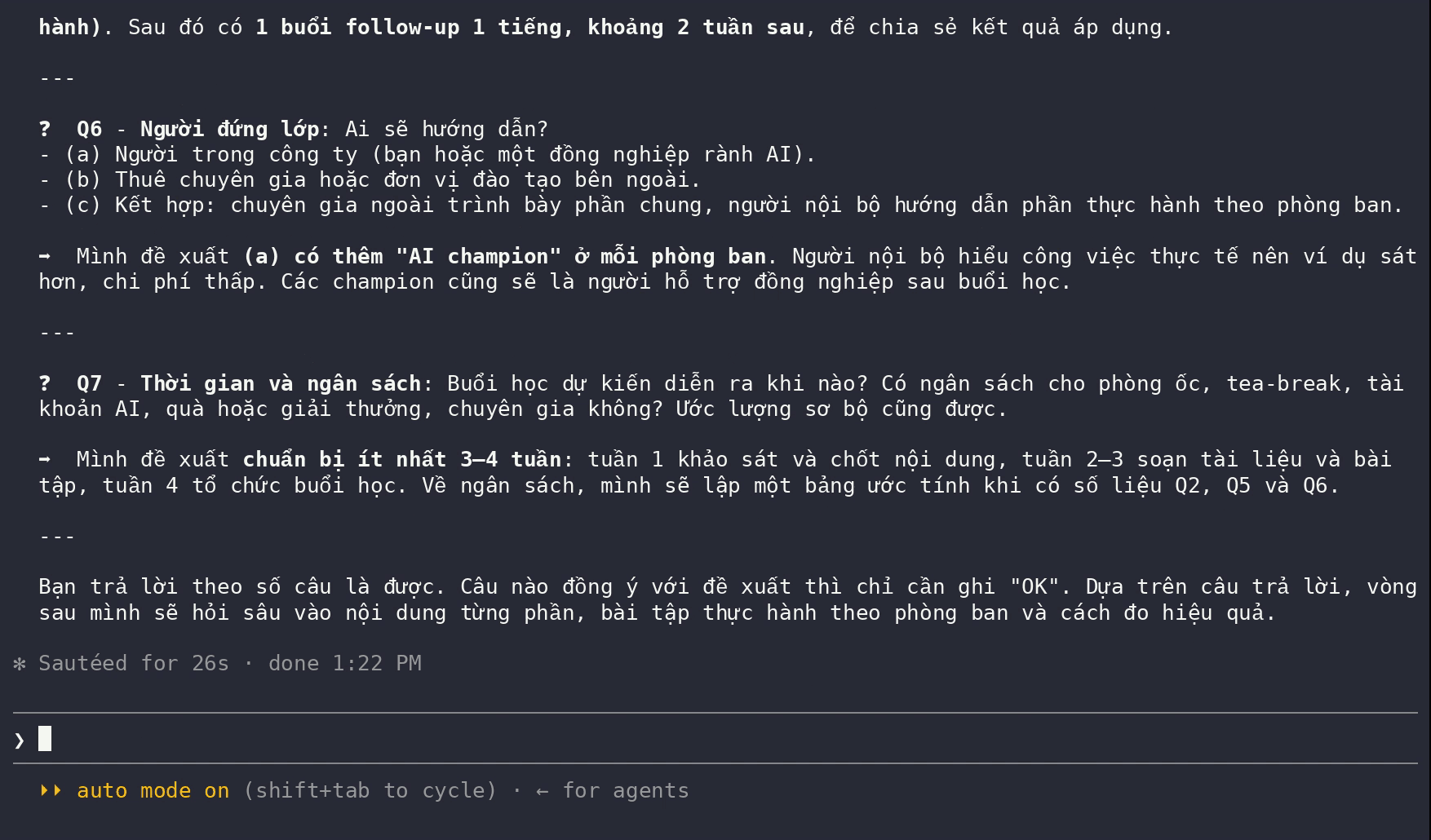
The first round had 7 questions: the goal, the company and attendees, how familiar staff already are with AI, AI tools and data policy, format and length, who teaches, and timing and budget. Each one had a ➡️ recommendation, for example "one 3-hour session, one third theory, two thirds practice".
How to answer quickly
- Answer by question number, e.g. "Q5: 2 hours on Friday afternoon".
- Write OK to accept, or in one go: "the rest as you recommend".
- Give the real constraints the AI cannot guess: headcount, time, budget, venue. This is what makes the plan usable.
The round 1 answer used here, translated:
More context: 40 staff, mostly accounting and sales, nobody codes. We only have 2 hours on a Friday afternoon. Budget is at most 15 million dong. It happens at our office. Everything else as you recommend.
Round 2: deeper questions built on your answers
Round 2 recapped what was settled, then asked 7 new questions based on it. The most telling was Q8: 15 million dong is not enough for paid accounts for 40 people, so Claude offered three options and recommended free plans for everyone plus paid plans for a few "AI champions".
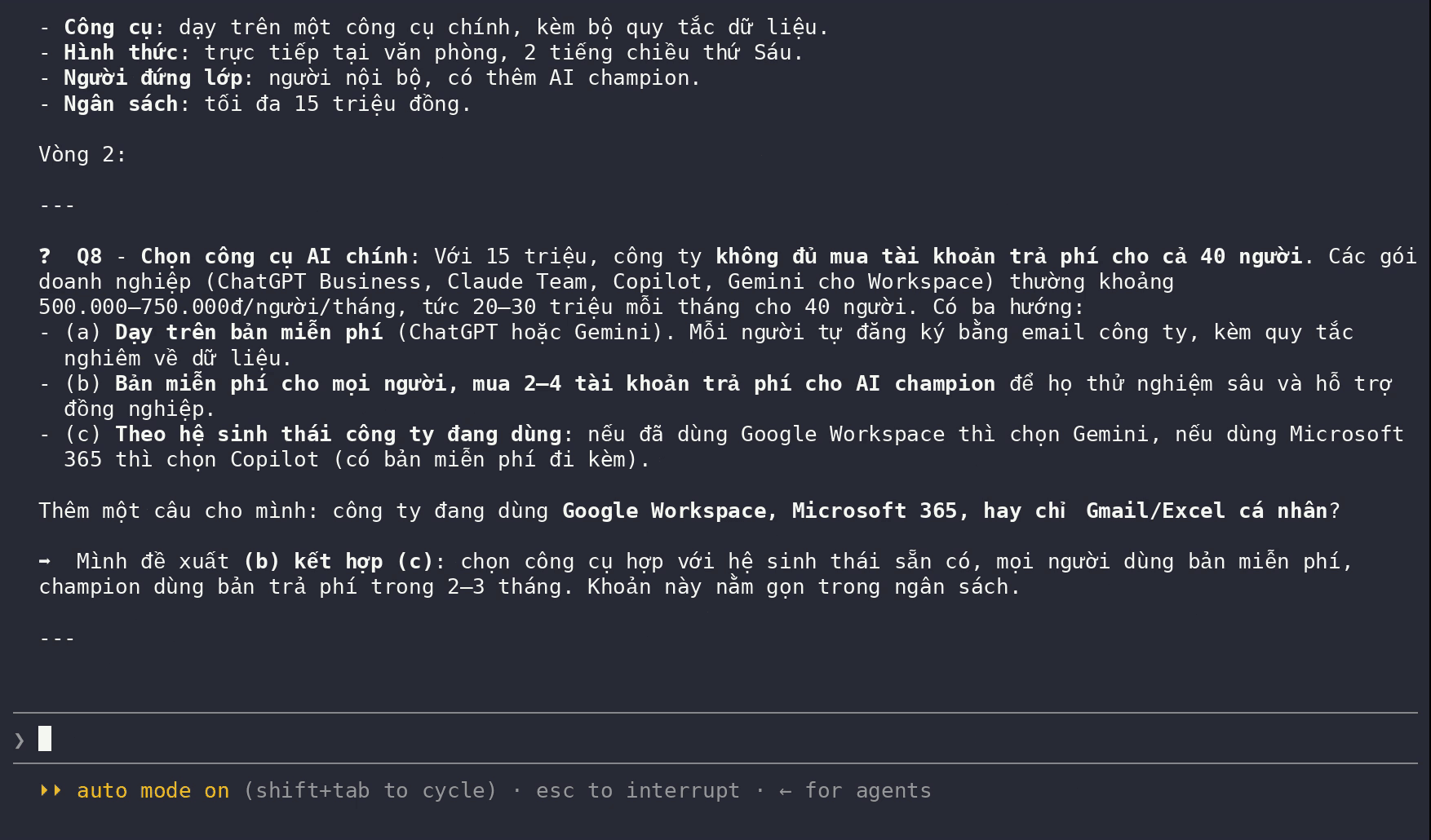
The rest covered the lead trainer, a programme that fits exactly 2 hours, the room and equipment, exercises for each group, the date and a follow-up session, and how to measure results. Answering "Agreed, as you recommend" was enough.
Confirm, then it writes
In the last round Claude drew up a budget table adding up to exactly 15,000,000 dong, summarised the whole plan, and stopped to ask for an "OK, write it" before creating the file.
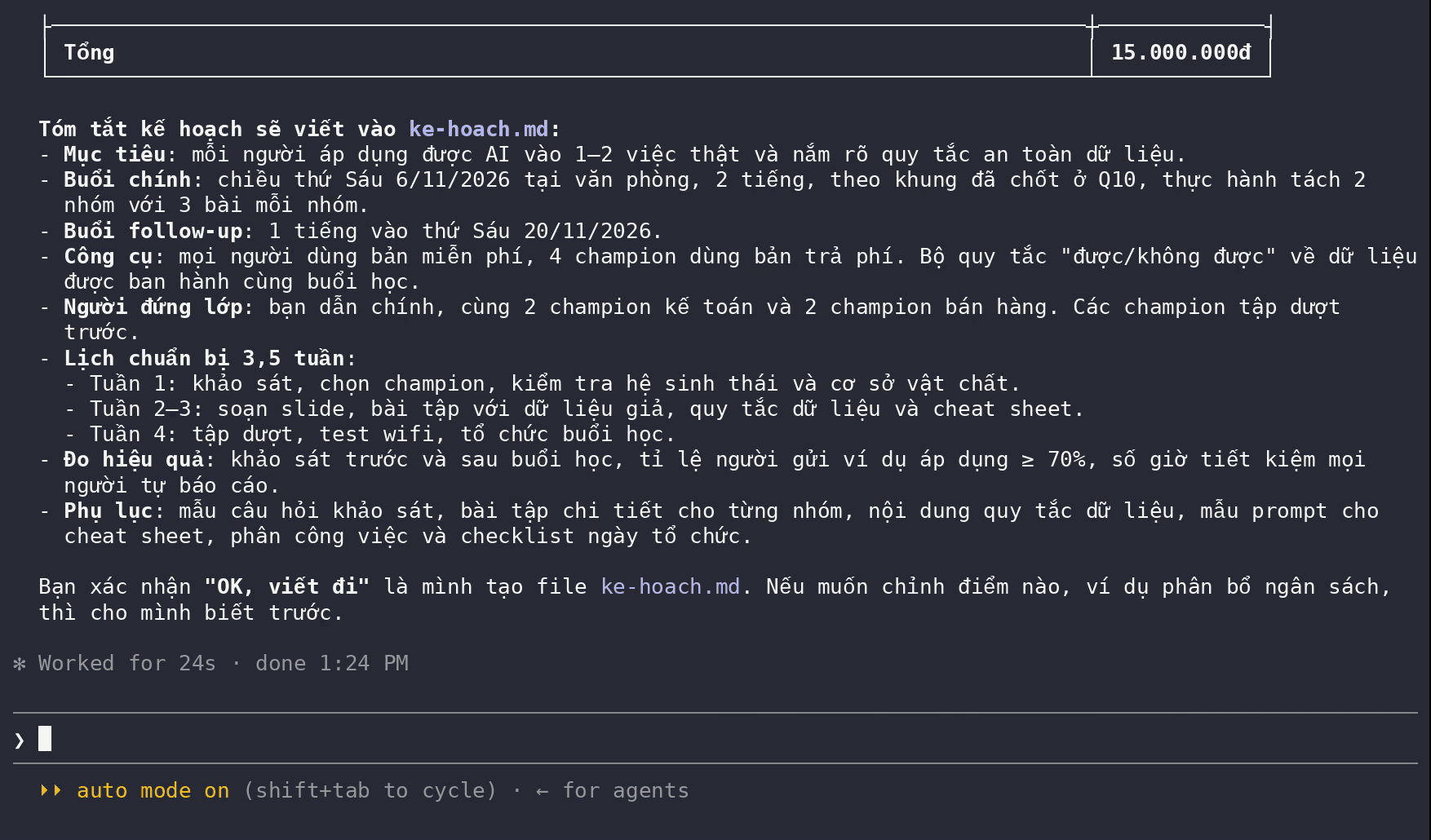
After confirmation it wrote 317 lines to ke-hoach.md. From the first prompt to the finished file took under 6 minutes, with three replies.
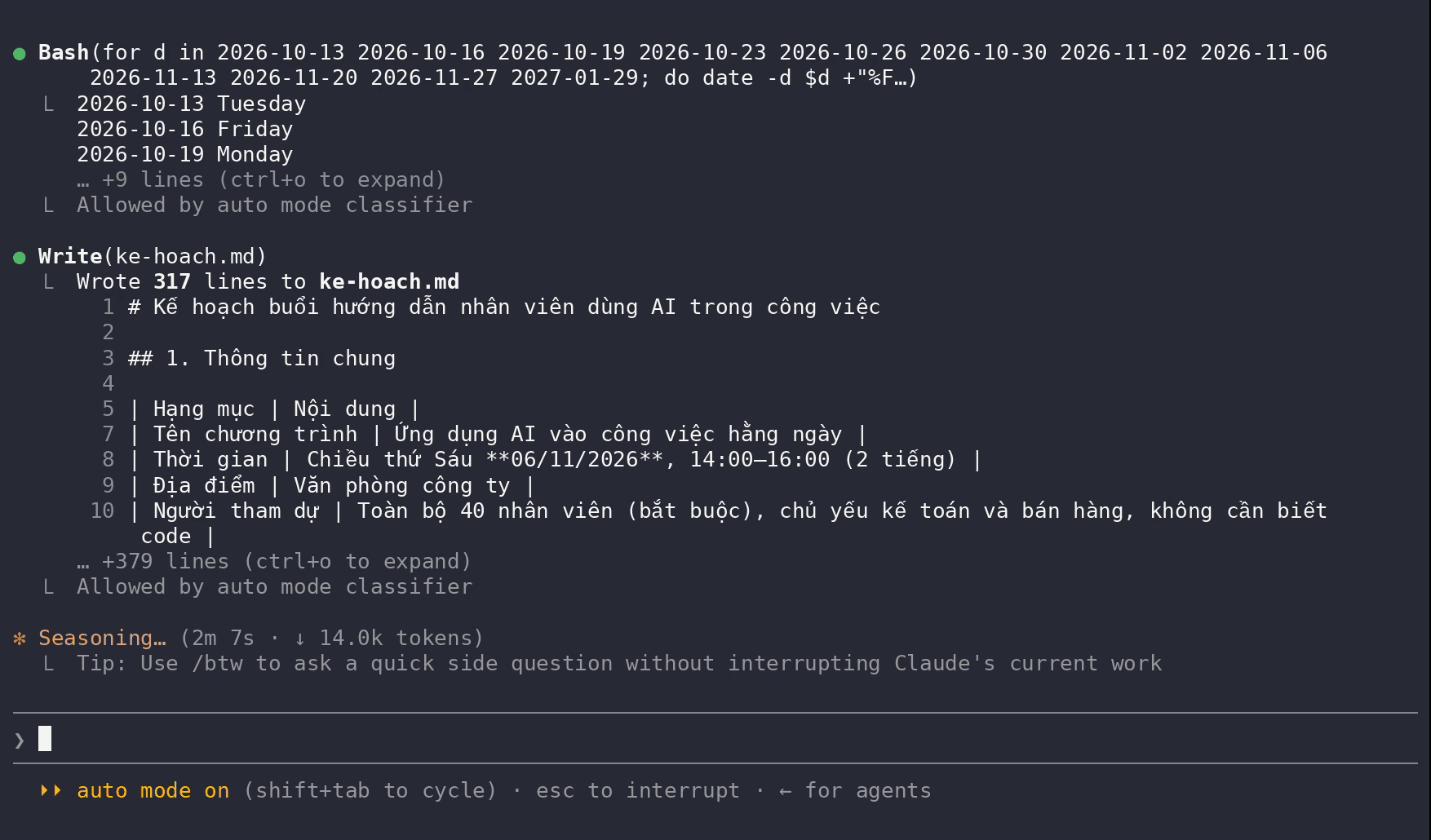
Result: the plan fits the real constraints
| Constraint given | In the plan |
|---|---|
| Only 2 hours on a Friday afternoon | Friday 6 November 2026, 14:00–16:00; 1-hour follow-up on 20 November |
| 40 people, accounting and sales, nobody codes | All 40 staff, hands-on work split into accounting and sales groups, no coding needed |
| Budget at most 15 million dong | Budget table totalling 15,000,000 dong: free plans for everyone, paid plans for 4 champions |
| At the office | At the office, with a checklist for the room, Wi-Fi and projector |
It also includes a week-by-week preparation schedule, exercises per group, data rules and success measures (target: at least 70% of staff share one real use case within 2 weeks).
Quick comparison: same request, no skill
The same request without /grill-me: Claude wrote 278 lines straight away in about a minute and a half. Knowing nothing about the company, it had to guess: a 3.5-hour morning session (8:30–12:00), blanks for headcount and budget, and groups that included Engineering/IT with code-explaining exercises. At the end of the draft Claude did list the decisions the company still had to make, but only after writing it.
That is not Claude's fault: the request said nothing about the company. The difference is the order. Without the skill it guesses, then writes; with the skill it asks, then writes.
When to use /grill-me
- Work with many unknowns: plans, events, feature designs, big decisions. The more Claude would have to guess, the more the skill helps.
- To stop early, type "the rest as you recommend". The recommendations are usually sensible.
- Skip it for small, clear tasks: several rounds of questions only slow you down. Put the constraints straight into the prompt instead.
The previous episode of the Skill AI series: Claude's Excel skill: available without installing anything?.
Frequently asked questions
Does grill-me run automatically when I plan something?
No. The grill-me SKILL.md sets disable-model-invocation: true, so Claude never calls it on its own. Start your prompt with /grill-me. The underlying grilling skill can be picked up automatically when you say you want your plan "grilled".
Do I have to answer every question?
No. Answer the ones you have an opinion on and write "the rest as you recommend". In this run, all three replies ended with that phrase.
Can I use grill-me for non-programming work?
Yes. This guide used it for a training plan with no code at all. The skill only defines how to ask questions. grill-with-docs leans towards software projects because it records decisions as technical documentation.
Does grill-me use more of my usage limit?
A little more, because of the extra rounds. In this test the skill run took under 6 minutes, the run without it about a minute and a half. In return you do not have to fix a plan built on wrong assumptions.
Sources
- mattpocock/skills — README, LICENSE
Vendor page
- SKILL.md của skill grilling
Vendor document
- SKILL.md của skill grill-me
Vendor document
- Claude Code docs — Discover plugins
Vendor document