How to Claim Claude Max API Credits ($100–$200 a Month) and Pick the Right Organization
Claude Max and Team include monthly Claude API credits, but you must link a Console organization to receive them. The steps, how to verify the credit is being used, and the wrong-organization mistake we made.
Claude Max and Team plans include monthly Claude API credits: $100 on Max 5x, $200 on Max 20x, up to $500 on Team. The credits are not added automatically. You link a Claude Console organization under Billing, and unclaimed credits are lost at the end of each cycle. Here is how to claim them, plus the mistake we made.
Watch the 55-second video (Vietnamese): https://youtube.com/shorts/GgYThGh8hqU
Which plans get API credits
| Plan | Monthly credit |
|---|---|
| Max 5x | $100 |
| Max 20x | $200 |
| Team, Standard seat | $20 per seat, pooled, capped at $500 |
| Team, Premium seat | $100 per seat, pooled, capped at $500 |
| Free, Pro, Enterprise | Not eligible |
Anthropic announced the credits alongside Claude Haiku 5.5 on 7 Oct 2026. New subscribers can claim after 7 days on an eligible plan. Plans bought through the iOS or Android app are eligible, but you claim on claude.ai in a browser.
Claim your credits in 3 steps
- On claude.ai, open Settings › Billing (Max) or Organization settings › Billing (Team).
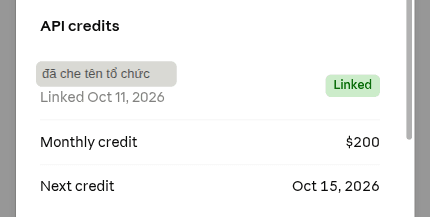
- In API credits, click Link organization, choose the Claude Console organization that should receive the credits, and link it. You can create a Console organization during this step.
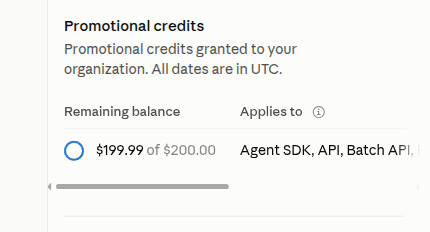
- In Claude Console, open Settings › Billing: the credits appear under Promotional credits with their expiry date.
Pick the right organization
Each plan links to one Console organization and you can't change it yourself — only support can. Link the organization that holds the API key your app actually uses.
We got this wrong. We linked our personal organization on 11 Oct 2026, but the key our site runs on lived in a different organization. The credit sat untouched at $200 while every API call was still charged to a card. We only noticed when Console showed the credit hadn't moved.
Quick check:
- In Console, open API keys for the linked organization and confirm your app's key is listed (compare the last 4 characters).
- If not, create a new key in the credited organization and swap it into your app.
- Make one call and watch Promotional credits: a lower balance (for example $200.00 → $199.99) means the credit is being used.
What the credits cover
| Covered | Not covered |
|---|---|
| Claude API | Claude Code |
| Claude Agent SDK | Extra usage in the Claude apps |
| Claude Managed Agents | Claude on AWS, Bedrock, Google Cloud, Microsoft Foundry |
| Console Playground |
Credits don't change your usage limits in Claude or Claude Code. Every API key and workspace in the linked organization draws from the same balance.
When credits run out
- Credits expire at the end of each billing cycle and don't roll over.
- With no other credits in the organization, API requests stop until the next monthly credit. Usage is never charged to your Claude plan.
- If the organization has purchased credits, those are used next — and auto-reload, if on, charges the card on file.
FAQ
Does Claude Pro include API credits?
No. Only Max 5x, Max 20x and Team (including discounted Nonprofit and Scientist Team plans).
I linked the wrong organization. What now?
You can't change it yourself; contact Anthropic support. Meanwhile, create an API key inside the organization that received the credits.
I don't see API credits in Billing.
Ineligible subscribers (wrong plan, or under 7 days) don't see the section. If you're sure you qualify, contact support.
Sources
- Claude Docs — API credits for Max and Team plans
Vendor document
- Claude Help Center — API credits for Max and Team plans
Vendor document
- Anthropic — Credit terms
Vendor document