What's new in NotebookLM Pro? Key updates to the paid tier and when a business should use it
Helps you understand the main changes to NotebookLM's paid tier (officially NotebookLM Plus) by date, how it differs from the standard version, and which Google Workspace plans give a small business access to it.
What's new in NotebookLM Pro? In Google's official material, the paid tier is called NotebookLM Plus, and the product is now named Gemini Notebook. Notable changes include higher usage limits, a three-panel interface, Mind Map, an output language selector and, from June 2026, agentic research plus PDF, Word and Excel export.
The name: NotebookLM Pro, NotebookLM Plus or Gemini Notebook?
Many people search for "NotebookLM Pro", and some Vietnamese tech sites use that name too. However, in the official sources checked for this guide, Google does not use "Pro" for NotebookLM:
- On December 13, 2024, Google announced NotebookLM Plus as the paid version for power users, teams and enterprises.
- Google Workspace's Vietnamese product page now presents the product as Gemini Notebook (formerly NotebookLM).
So when you read articles, pricing pages or help docs, "NotebookLM Pro" usually refers to NotebookLM Plus, or to NotebookLM bundled with a paid Google subscription. When buying, go by the plan name on the vendor's pricing page, not by the name used online.
What's new in NotebookLM Pro: updates by date
The changes below are listed in the order Google announced them. Most come from Google's official blog and the Google Workspace Updates blog; the newest (2026) come from Vietnamese press coverage of a Google Vietnam event.
December 2024: paid tier launch and a new interface
In its December 13, 2024 announcement, Google said:
- NotebookLM Plus launched: a premium version with extra features and higher usage limits than the standard version, aimed at power users, teams and enterprises.
- Gemini 2.0 Flash (experimental) began rolling out in NotebookLM.
- A three-panel interface: the Sources panel manages your project's documents; the Chat panel lets you discuss your sources with citations; the Studio panel creates new content from sources in one click, such as Study Guides, Briefing Docs and Audio Overviews. You can open the source viewer and notes editor side by side, or ask questions in Chat while listening to an Audio Overview.
- Joining an Audio Overview: an interactive mode (in BETA) lets you use your voice to ask the AI hosts for more detail or a different explanation. Answers draw on the sources you uploaded.
How to use interactive mode, as described by Google:
- Create a new Audio Overview.
- Tap the Interactive mode (BETA) button and press play.
- While listening, tap "Join"; a host will call on you.
- Ask your question out loud.
March 2025: part of Google Workspace, Mind Map and output language
The Google Workspace Updates post of March 19, 2025 listed these changes:
- NotebookLM and NotebookLM Plus became Google Workspace core services for business customers, with Context-Aware Access support for admins.
- Interactive Mind Map: shows the topics in a notebook as a mind map so you can follow connections between ideas.
- Output language selector: study guides, briefing docs and chat responses are generated in the language you choose.
- Both features are available to standard NotebookLM and NotebookLM Plus users, with a gradual rollout of up to 15 days from March 19, 2025.
The same post says NotebookLM is available in 180+ regions where the Gemini API is available and supports 35+ languages. At that time, Audio Overview speech was English only, even if your sources were in another language. It applies to admins and end users aged 18 and over.
From June 2026: agentic research and more export formats
According to reports by Sai Gon Giai Phong and Phap Luat TP.HCM (published on tuoitre.vn) on upgrades Google presented in Vietnam, NotebookLM gains:
- Agentic AI in Chat: rather than only answering from existing documents, NotebookLM can suggest references, find more material on the web through Google Search and propose approaches. Users still decide which sources to keep or remove.
- A dedicated computing environment per notebook: the system can write and run code to analyze data, draw charts and find trends without moving data into other software.
- More export formats from Studio: PDF reports with charts, Word documents, Excel spreadsheets, PowerPoint decks, CSV or JSON files.
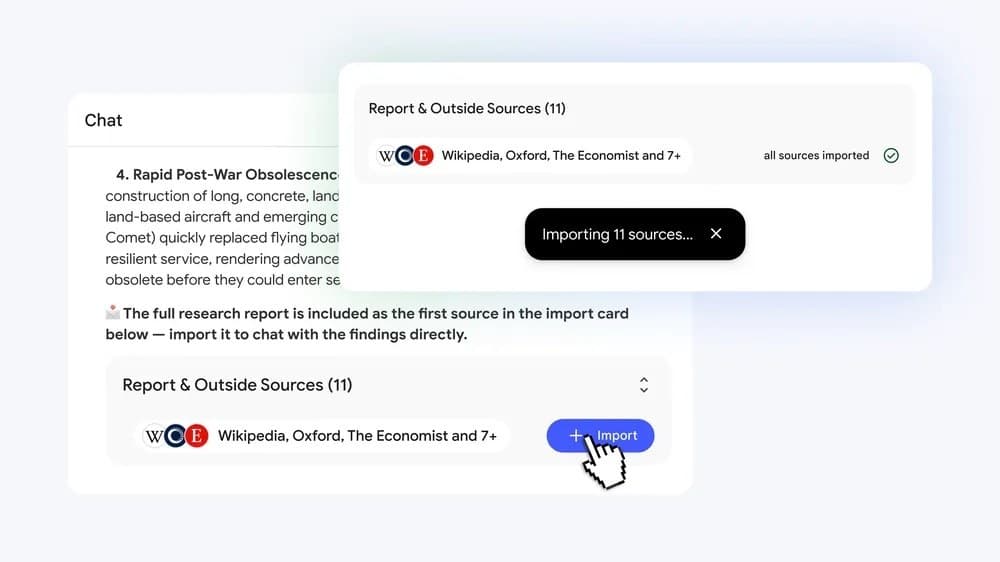 Image: Tuổi Trẻ · Source: tuoitre.vn
Sai Gon Giai Phong reported that these updates are starting to roll out on the web for Google AI Ultra users and Workspace business customers. In other words, not every paid user gets them right away; check your own account. An example given at the event was a small business owner using NotebookLM to compare raw sales data with ad spending.
Features not confirmed by official sources
An article on Sforum (CellphoneS) lists additional "NotebookLM Pro" features: longer context memory in Chat, setting goals for Chat to steer responses, Video Overviews, and more Studio output types such as marketing plans or video scripts. The official sources checked for this guide do not mention these points, so treat them as reference only and verify them on Google's help pages before buying.
How do the standard and paid versions differ?
The table below only includes what official sources state clearly. Specific limits (number of notebooks, sources, daily queries) are not in the sources used, so check the vendor's help or pricing page.
| Criteria | NotebookLM (standard) | NotebookLM Plus (paid) |
|---|---|---|
| Usage limits | Standard level | Higher than standard |
| Features | Core feature set | Extra features for power users and teams |
| Mind Map, output language selector | Yes | Yes |
| Audio Overview | Yes | Yes |
| Included in Workspace as a core service | Business Starter and some other plans | Business Standard, Business Plus, Enterprise Standard, Enterprise Plus |
| Agentic updates, Office file export (June 2026) | No source says so yet | Starting with Google AI Ultra and Workspace business customers |
How can a small business get the paid NotebookLM?
For businesses already using or planning to use Google Workspace, the simplest approach is to check which NotebookLM version your Workspace plan includes. According to the March 2025 announcement:
| Google Workspace plan | NotebookLM included |
|---|---|
| Business Starter | NotebookLM (core service) |
| Frontline Starter, Frontline Standard | NotebookLM (core service) |
| Essentials Starter, Essentials, Enterprise Essentials, Enterprise Essentials Plus | NotebookLM (core service) |
| Nonprofits | NotebookLM (core service) |
| Business Standard, Business Plus | NotebookLM Plus (core service) |
| Enterprise Standard, Enterprise Plus | NotebookLM Plus (core service) |
Customers who previously bought the Gemini Business or Gemini Enterprise add-ons also get NotebookLM Plus; those add-ons stopped being sold on January 15, 2025. Google Workspace's Vietnamese page now says Gemini Notebook is available in all Workspace plans and offers a 14-day free Workspace trial. Plan lists may have changed, so double-check before buying. For costs, see the vendor's pricing page.
When to consider it, and when you don't need it yet
Consider the paid tier (or a Workspace plan that includes NotebookLM Plus) when:
- You regularly hit the standard version's limits when working with many documents.
- Several people in the company need shared notebooks, such as onboarding materials, policy handbooks or product specs for the sales team.
- The person handling IT needs central control: turning the service on or off, Context-Aware Access, and sharing permissions within the organization.
- Accountants or owners want to analyze figures and export directly to Excel or PDF (provided the account has the 2026 update).
You don't need to upgrade yet when:
- You only occasionally summarize a few short documents and haven't hit the standard limits.
- Your company already uses a Workspace plan that includes NotebookLM Plus. In that case, just ask your admin to turn the service on; no extra purchase is needed.
Steps to check before buying
- Ask your company's Google Workspace admin which plan the organization uses and compare it with the table above.
- If the plan includes NotebookLM or NotebookLM Plus, ask the admin to follow the guide on turning NotebookLM on or off in the Google Workspace Admin Help.
- Try it with a real but non-sensitive set of documents, such as an employee handbook or product catalogue, to see whether the standard version is enough.
- Note each time you hit a limit or miss a needed feature; this is the basis for deciding to upgrade.
- Check the vendor's pricing page and the NotebookLM help pages for each plan's exact limits at the time you buy.
Notes on business data
For Google Workspace customers, Google states that uploads, queries and responses are not used to train models, are not reviewed by humans or used for product improvement without permission, and are not shared outside the organization's trust boundary. Users can only upload Workspace files they have access to and can set permissions for each notebook.
These commitments are stated for Workspace; the sources used do not give equivalent detail for personal Google accounts. If you plan to upload contracts, payroll or customer data, read Google's terms and consult a legal professional about your business's personal data protection obligations.
Frequently asked questions
What's new in NotebookLM Pro compared with the free version?
According to Google, the paid tier (officially NotebookLM Plus) has higher usage limits and extra features for teams and businesses. Features such as Mind Map and the output language selector are available in both versions. The 2026 upgrade with source discovery and Office file export is rolling out first to Google AI Ultra and Workspace business customers.
Are NotebookLM Pro and NotebookLM Plus the same thing?
Google's official sources use NotebookLM Plus for the paid tier; "NotebookLM Pro" is a popular name used online. Google now calls the product Gemini Notebook. When buying, go by the plan name on the vendor's pricing page.
Does a company on Google Workspace need to buy NotebookLM separately?
Usually not. According to the March 2025 announcement, NotebookLM Plus is included in Business Standard, Business Plus, Enterprise Standard and Enterprise Plus; Business Starter includes standard NotebookLM. The admin only needs to turn the service on for users.
Can NotebookLM be used in Vietnamese?
Yes. NotebookLM supports 35+ languages and lets you choose the output language for responses and generated documents. As of March 2025, Audio Overview speech was English only; check again, as this may have expanded.
Is data uploaded to NotebookLM used to train AI?
For Google Workspace, Google commits that uploads, queries and responses are not used to train models and are not shared outside the organization. For personal accounts, read Google's own terms before uploading sensitive documents.
Sources
- Gemini Notebook (trước đây là NotebookLM): Công cụ trợ lý nghiên cứu và học tập dựa trên AI | Google Workspace
Vendor page
- NotebookLM announces NotebookLM Plus and other new features
Vendor page
- Google Workspace Updates: New features available in NotebookLM and NotebookLM Plus
Vendor page
- Một công cụ AI đang được người Việt dùng nhiều vừa có nâng cấp lớn
Press
- Google giới thiệu tính năng mới Gemini và NotebookLM tại Việt Nam | BÁO SÀI GÒN GIẢI PHÓNG
Press
- NotebookLM Pro Có Gì Mới? Cập Nhật Tính Năng Nổi Bật
Other source