What Are Claude Skills? Install One From GitHub and Test the PowerPoint Skill
A skill is a folder of instructions Claude opens when a task matches its description. How to install anthropics/skills in Claude Code with two commands, and a real run of the PowerPoint skill: six slides with a chart, self-checked and self-fixed.
A Claude Skill is a folder of instructions that Claude opens on its own when your request matches it: a name, a description, the steps to follow and, optionally, scripts. This guide explains what a skill is, how to install one from GitHub into Claude Code, and then runs the PowerPoint skill for real on a sales spreadsheet.
Tested on October 8, 2026 with Claude Code 2.1.293 on Linux. The figures in the file are sample data, not any company's real revenue. The deck in the test is in Vietnamese.
Watch the real test run (3 min 45 s, Vietnamese narration): https://youtu.be/wDorAILWYxo
What is a Claude Skill?
A skill is a folder that must contain a SKILL.md file:
- The top of the file holds
nameanddescription(what the skill does and when to use it). - The rest is the detailed instructions: steps, caveats, how to check the result.
- It can also include a
scripts/folder, reference documents and templates.
Claude does not read every skill up front. It loads them in three layers:
- Discovery: at startup it only reads each skill's name and description.
- Activation: when your request matches a description, Claude reads the full
SKILL.md. - Execution: bundled scripts and resources are used only when needed.
You can also call a skill directly with /skill-name in Claude Code. Unlike a prompt you paste every time, a skill stays on your machine and is reused on every later task.
Where to find skills
Anthropic publishes a public skill repository on GitHub: github.com/anthropics/skills. It has two main groups:
- document-skills: four skills for Word (
docx), PDF (pdf), PowerPoint (pptx) and Excel (xlsx) files. These four are source-available, not open source. - example-skills: sample skills for design, development, internal communication, creating new skills and more, under the Apache 2.0 license.
According to the repository README, the document skills are already available in the Claude apps on paid plans. The skill format is also an open standard (agentskills.io): OpenAI Codex, GitHub Copilot, Cursor, Gemini CLI and other tools can read the same skill folder, although support differs from tool to tool.
How to install a skill from GitHub in Claude Code
In a terminal, run two commands:
claude plugin marketplace add anthropics/skills
claude plugin install document-skills@anthropic-agent-skills --scope project
- The first command adds the
anthropics/skillsrepository to Claude Code's marketplaces, under the nameanthropic-agent-skills. - The second installs the
document-skillsplugin.--scope projectenables it only in the current folder: Claude Code writesenabledPluginsto that folder's.claude/settings.json.
Inside Claude Code, type /plugin marketplace add anthropics/skills and then /plugin install document-skills@anthropic-agent-skills. To remove it: claude plugin uninstall document-skills@anthropic-agent-skills.
Skills you write yourself need no marketplace: put the folder at ~/.claude/skills/<skill-name>/SKILL.md to use it in every project, or at .claude/skills/<skill-name>/ for a single project.
Test run: six slides from a CSV file
The test folder holds doanh-thu-q3.csv with 9 rows: revenue and order counts for 3 branches (District 1, District 3, Thu Duc) in July, August and September. The request sent to Claude Code (in Vietnamese) asked it to use the pptx skill to build a 6-slide Vietnamese deck summarizing third-quarter revenue for the three branches, with one column chart of monthly revenue, saved as bao-cao-q3.pptx.
What appeared in the terminal, in order:
- Loading the skill: Claude called
document-skills:pptxand reported "Successfully loaded skill". - Checking available libraries: there was no icon library on the machine, so Claude used colored circles with branch codes (Q1, Q3, TĐ) instead of installing more packages.
- Writing a script: it created
tao-bao-cao.js, over 300 lines, using the pptxgenjs library to build each slide and the chart. - Checking itself: it ran the skill's validation step ("All validations PASSED"), then rendered every slide to an image to review it.
- Fixing itself: on the first review Claude found 3 line-wrapping problems on slides 2, 4 and 6, fixed the script, and the second check passed.
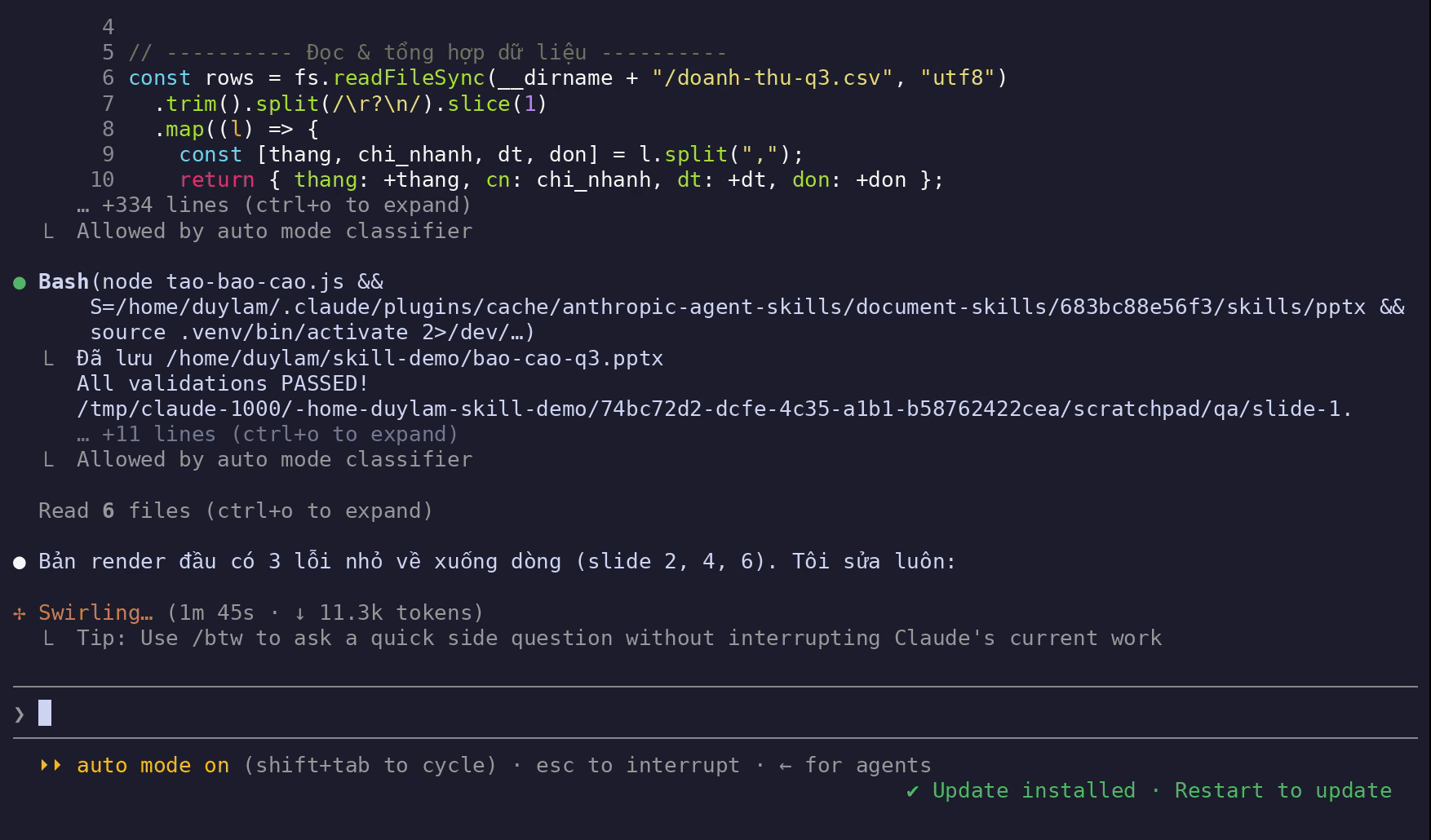
From sending the request to finishing took about 2 minutes 10 seconds. This session had Claude Code's auto mode on, so the commands Claude ran were approved by that mode instead of asking each time.
Result: six slides with a native PowerPoint chart
bao-cao-q3.pptx contains a title slide, a Q3 overview (four key figures), monthly revenue chart, a comparison of the three branches, growth from July to September, and conclusions with recommendations.
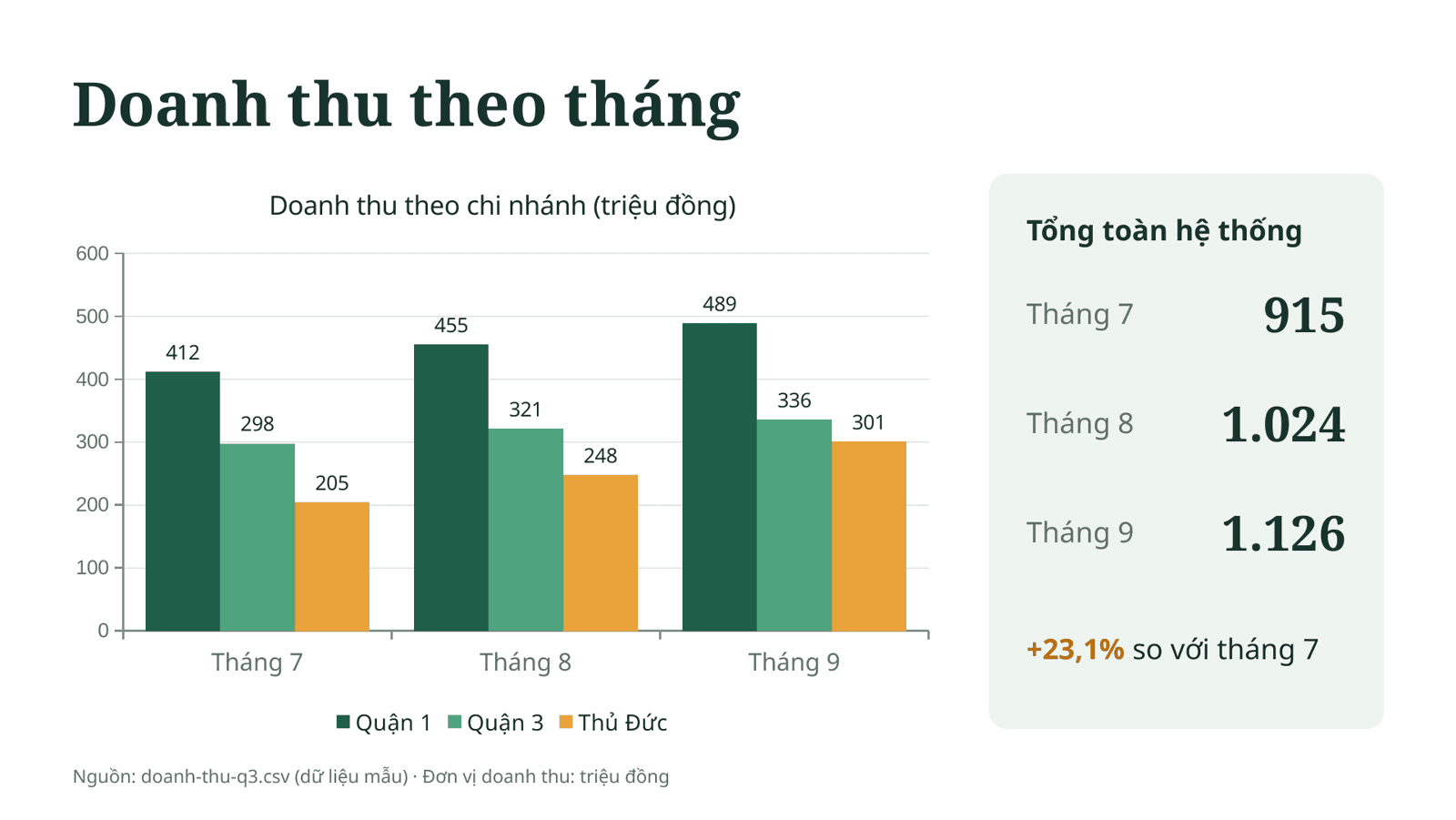
- The chart is a native PowerPoint chart, not a pasted image, so you can edit the data after opening the file.
- The figures match the source file (Dùng Gì re-added them by hand): total revenue of 3,065 million VND, 23,950 orders, 23.1% growth from July to September; District 1 accounts for 44.2%, District 3 for 31.2%, Thu Duc for 24.6%.
- The recommendations on the last slide were written by the AI from sample data. With real figures, a person should still review them.
What you need to run it yourself
According to the pptx skill's SKILL.md, the machine needs:
- Claude Code with the
document-skillsplugin installed as above. - Node.js and the pptxgenjs library to build the PowerPoint file.
- Python with the libraries the skill uses to read and check files (such as defusedxml and markitdown).
- LibreOffice and pdftoppm (Poppler) to convert slides to PDF and images during the self-check.
In this test, the libraries were installed in the working folder before sending the request, so Claude did not have to install unfamiliar packages on its own.
Safety notes when installing skills
- Skills and plugins can run code on your machine with your account's permissions. Claude Code's security documentation advises installing only what you trust, since Anthropic does not control what third-party plugins contain.
- Read before you use it:
SKILL.md, the scripts, and any hook commands the plugin ships. - Plugins can update themselves, so what you reviewed may change later.
To compare AI assistants for office work before choosing one, see ChatGPT vs Gemini vs Claude vs Copilot.
Frequently asked questions
Are Claude Skills free?
A skill itself is just a folder of text and scripts: writing one costs nothing, and the anthropics/skills repository is free to download. But using a skill requires Claude: according to the repository README, the document skills are available in the Claude apps on paid plans; in Claude Code you install them as shown above.
How is a skill different from a prompt?
A prompt has to be pasted every time. A skill stays on your machine, Claude loads it automatically when your request matches its description, and it can include runnable scripts, such as the PowerPoint skill's file check.
Can Claude skills be used with Codex or Copilot?
The skill format is an open standard (agentskills.io). OpenAI Codex, GitHub Copilot, Cursor, Gemini CLI and other tools can read skill folders, but support and installation differ by tool.
How do I remove an installed skill?
Run claude plugin uninstall document-skills@anthropic-agent-skills. To switch it off temporarily, use claude plugin disable.
Sources
- Claude Code docs — Agent Skills
Vendor document
- anthropics/skills — README, LICENSE
Vendor page
- SKILL.md của skill pptx
Vendor document
- Claude Code docs — Plugin security
Vendor document
- Agent Skills — open standard
Other source