How to Create a Claude Skill With skill-creator: A Real Meeting-Minutes Test
Describe the task, let skill-creator write SKILL.md, then use it right away: a real test of a skill that turns hasty, diacritic-free meeting notes into Word minutes in a fixed template, without inventing anything.
The fastest way to create a skill for Claude is to have Claude write it with the skill-creator skill: you describe the task, Claude writes the SKILL.md file, and from the next session on it uses that skill on its own whenever a task matches. This guide runs it for real: a skill that turns hastily typed meeting notes into Vietnamese meeting minutes and exports a Word file.
Tested on October 8, 2026 with Claude Code 2.1.294 on Linux, with auto mode on. The meeting notes are sample data and the names are made up. The minutes in this test are in Vietnamese.
Watch the real test run (3 min 9 s, Vietnamese narration): https://youtu.be/7GzboMnylgo
When should you create your own skill?
A custom skill fits best for work you repeat in your own format:
- Meeting minutes, weekly reports: the same structure every week.
- Customer replies, quotes: your company's tone and template.
- Write once, reuse forever: from then on Claude loads the skill whenever your request matches its description, so you never paste the instructions again.
New to skills? Start with What Are Claude Skills? Install One From GitHub and Test the PowerPoint Skill.
Setup
The test folder holds ghi-chu-hop.txt: notes from a Q4 sales planning meeting, typed in Vietnamese without diacritics, full of abbreviations (500k, 2tr, fb), with one task that has no deadline and one open question. Two plugins from the anthropics/skills repository are installed:
claude plugin install example-skills@anthropic-agent-skills --scope project
claude plugin install document-skills@anthropic-agent-skills --scope project
example-skillsincludes theskill-creatorskill (plus other sample skills).document-skillsincludes thedocxskill for Word files.
If you have not added the anthropics/skills marketplace yet, first run claude plugin marketplace add anthropics/skills. The docx skill also needs Node.js's docx library, LibreOffice and pdftoppm for its self-check; in this test those were installed in the working folder beforehand.
Step 1: ask skill-creator to write the skill
Open Claude Code in that folder and describe the skill. The request (in Vietnamese) asked skill-creator to create a skill named bien-ban-hop in the folder's .claude/skills/ that turns hasty meeting notes (possibly without diacritics) into Vietnamese minutes with these sections: meeting info; attendees (present, absent); main discussion; decisions made; action items (who, what, deadline, writing "no deadline yet" when none is given); open issues. It must not add anything that is not in the notes, must export a Word file using the docx skill, and should not ask follow-up questions or run evals.
That last part matters: skill-creator normally runs test cases, scores them and asks for your feedback; saying you don't need that makes it write the skill directly. Claude loaded skill-creator (in this session, the version available with the Claude account, anthropic-skills:skill-creator), looked at the folder, read the sample notes, and after about 1 minute 15 seconds wrote .claude/skills/bien-ban-hop/SKILL.md, 106 lines long.
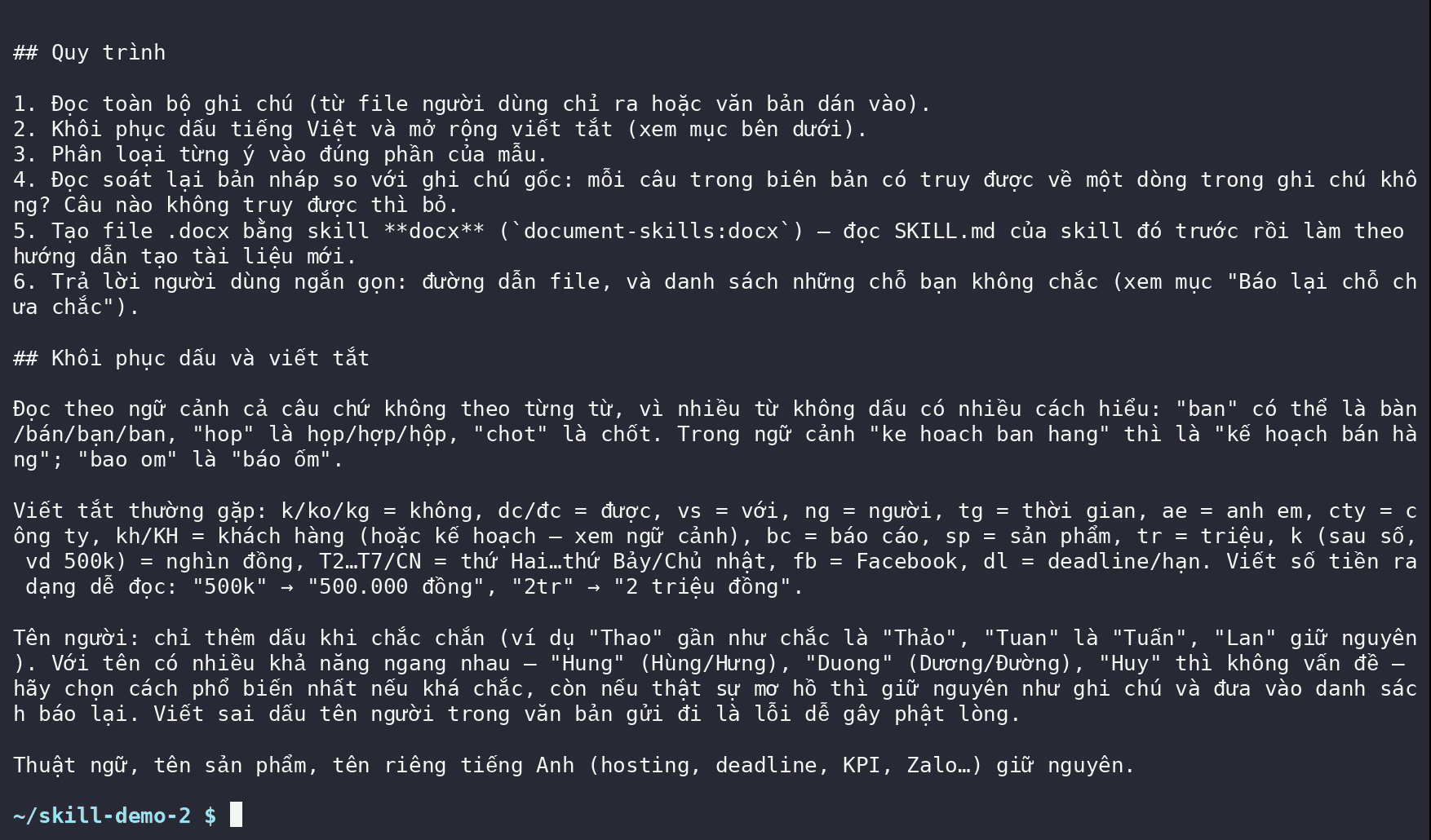
Inside the SKILL.md Claude wrote
- The description says exactly when to use it: whenever the user provides meeting notes or a
.txtfile of notes, including when they type "bien ban hop" or "ghi chu hop" without diacritics. - Rule number one: the minutes contain only what is in the notes. Missing information is marked as missing, never filled in by guessing.
- A 6-step process: read the notes, restore diacritics and expand abbreviations, sort each point, check that every sentence traces back to the notes, build the file with the
docxskill, report anything uncertain. - An abbreviation table and a rule for names: add diacritics to a name only when confident; keep ambiguous names as written and flag them.
- A fixed template: empty sections stay and say "No information", so readers know they were checked rather than skipped.
AI-written skills still need a human read: the worked example in the file says "Before Friday (10/10/2026)", but October 10, 2026 is a Saturday. In the real run Claude still got the date right by checking the calendar (see below), but a wrong example inside a skill should be fixed before you share it.
Step 2: use the new skill
Open a new Claude Code session and type only (in Vietnamese) "make meeting minutes from ghi-chu-hop.txt", without naming the skill. What appeared in the terminal:
- Claude loaded
bien-ban-hop(the new skill) on its own, thendocument-skills:docx. - It ran
dateto check weekdays for October 7, 9, 14 and 20, 2026. - It built the Word file, ran the docx skill's check ("All validations PASSED") and rendered each page to review it.
- It noticed the table's "No." column was wrapping, widened it and checked again.
- It finished after 1 minute 11 seconds with a list of points for you to double-check.
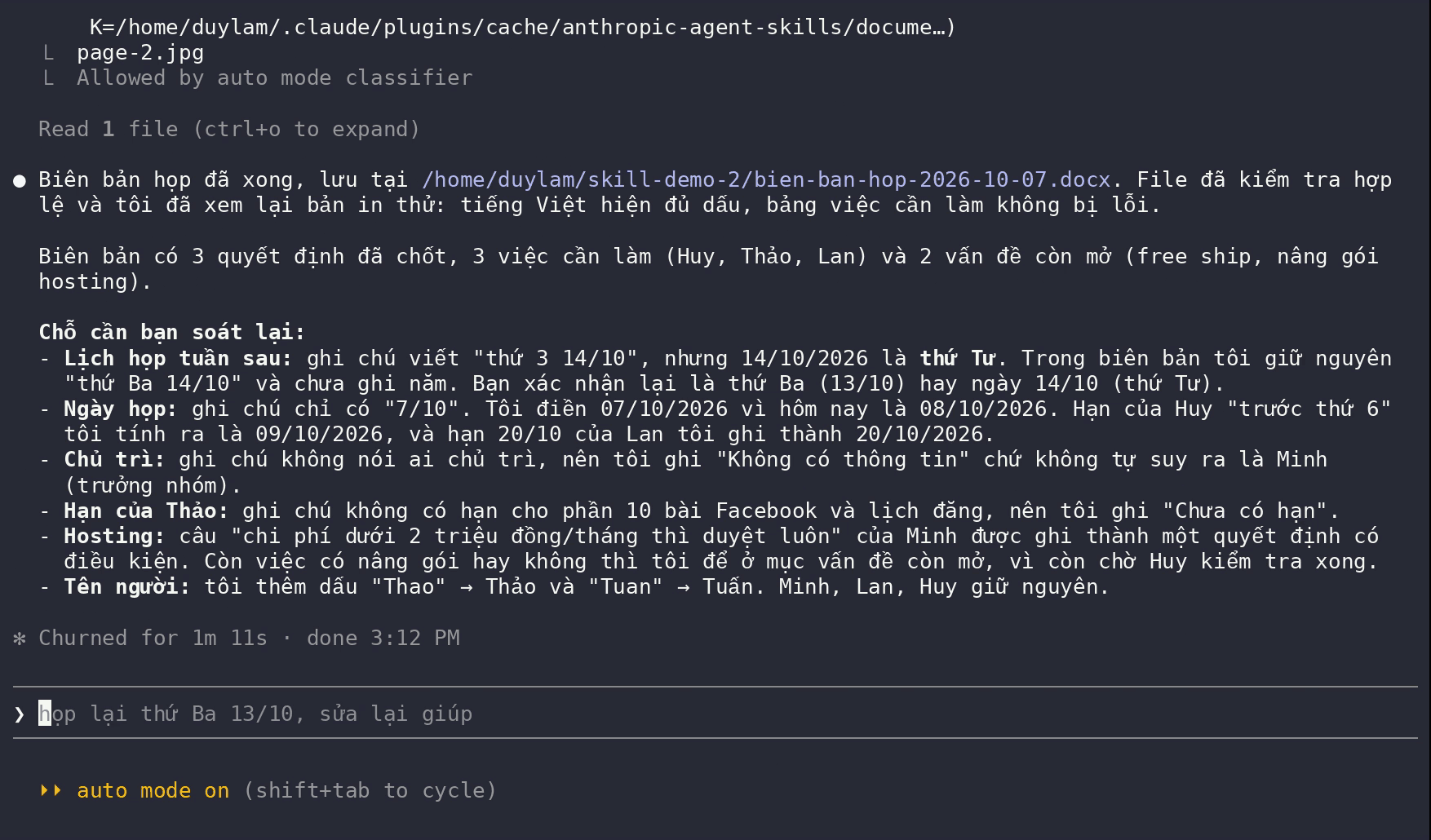
The most valuable item on that list: the notes say the follow-up meeting is "Tuesday 14/10", but October 14, 2026 is a Wednesday. Claude kept the notes' wording and asked, instead of silently picking one. It also flagged that the meeting date only said "7/10", so the year came from today's date; that nobody was named as chair, so it wrote "No information" rather than assuming the team lead; and that the names "Thao" and "Tuan" were given diacritics.
Result: Word minutes in the right template
bien-ban-hop-2026-10-07.docx has all six sections: meeting info, attendees (present, and absent with the reason), main discussion, 3 decisions, an action-item table and 2 open issues.
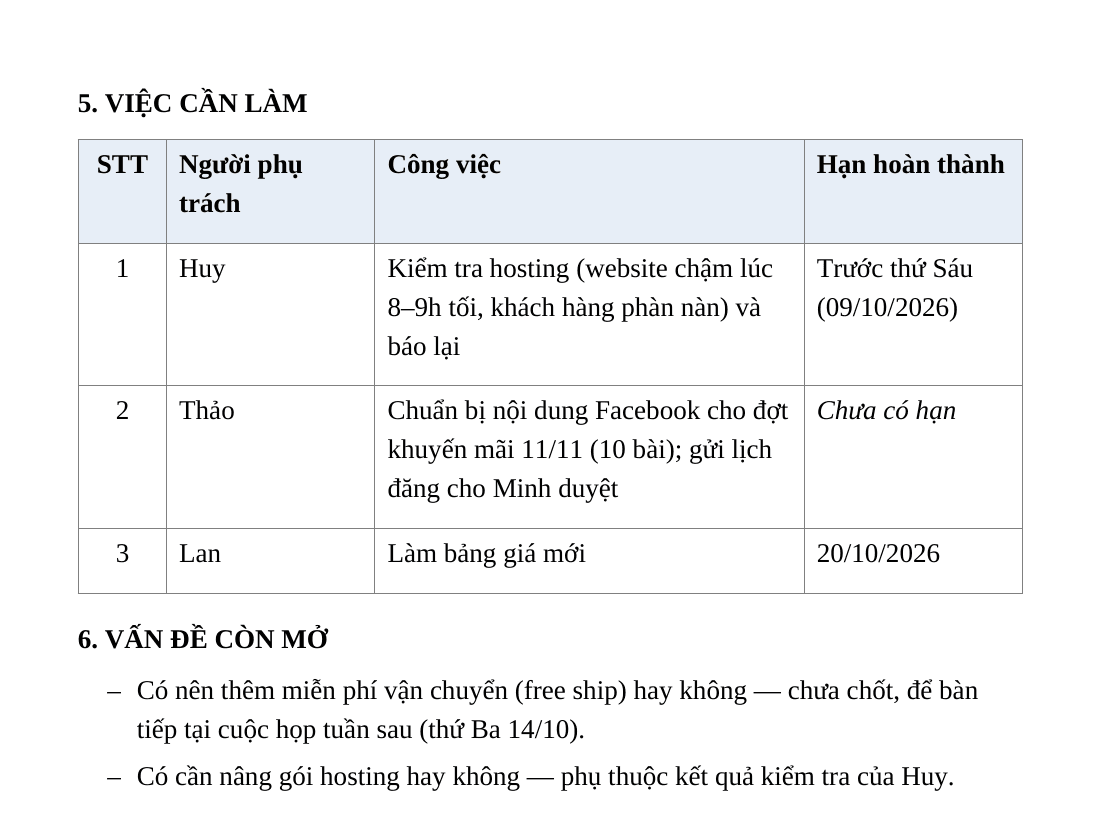
- The action-item table lists owner, task and deadline: "before Friday" is shown with the actual date (09/10/2026); one task had no deadline in the notes, so it says "no deadline yet".
- Nothing made up: checked point by point against the notes, there is no deadline, owner or decision that the notes don't contain.
- Conditional decisions keep their condition: upgrading the hosting plan is pre-approved only if it costs under 2 million VND a month.
Use the skill in every project
The skill lives in the test folder's .claude/skills/, so it only works there. To use it everywhere, copy it to your personal skills folder:
cp -r .claude/skills/bien-ban-hop ~/.claude/skills/
~/.claude/skills/ holds personal skills available in every project; .claude/skills/ inside a folder holds that project's skills, which you can commit to Git so the whole team gets them.
Three things that make this skill work
- The description says when to use it. Claude picks skills by their description, so the more specific it is (including how users actually type), the more reliably the skill is triggered.
- Hard rules, stated plainly: "add nothing beyond the notes; if something is missing, say so". This is what keeps the minutes honest.
- A worked example in the file: messy input and correct output. Read the example too, as the date mistake above shows.
Before you share a skill
- A skill is instructions for an AI that runs commands on your machine. Review it before sending it to colleagues, as you would a script.
- Never put passwords or sensitive data in a skill: skill files get copied around.
Frequently asked questions
Do I need to know how to code to create a Claude skill?
No. A skill is mostly a text file, SKILL.md, and skill-creator writes it from your description. You need to describe the task, the output template and the rules clearly, then read what Claude wrote.
Where do I get skill-creator?
skill-creator is an official Anthropic skill in the example-skills plugin of the anthropics/skills repository on GitHub, installed with claude plugin install example-skills@anthropic-agent-skills. In this test Claude used the version available with the Claude account.
How does Claude know when to use a custom skill?
At startup Claude only reads each skill's name and description. When your request matches a description, it loads the full instructions. That is why the description in SKILL.md decides whether the skill is triggered at the right time. You can also call it directly with /bien-ban-hop.
Will a custom skill make things up?
A skill is only instructions; if you don't want invented details, write that rule into the skill, such as "the minutes contain only what is in the notes". In this test the minutes contained nothing beyond the notes, and Claude flagged the contradictions and gaps itself. Documents you send out should still be reviewed by a person.
Sources
- Claude Code docs — Agent Skills
Vendor document
- anthropics/skills — README, LICENSE
Vendor page
- SKILL.md của skill-creator
Vendor document
- SKILL.md của skill docx
Vendor document